May 26, 2026
Disclaimer: this is not legal advice
Most freelance social media managers we speak to are stuck in one of two camps. Either they're feeding everything into ChatGPT with their fingers crossed (you know who you are 🙈), or they're so terrified of doing something wrong that they're refusing to touch AI at all and watching their workload eat them alive.
Both are dangerous!
The honest answer to “Is it safe to use AI with client data?” is: it depends entirely on which tools you're using, which plan you're on, and what kind of client information you're actually putting in. Get those three things right if you're going to use AI in your business.
1. Free vs paid AI plans: which ChatGPT and Claude versions actually keep client data private?
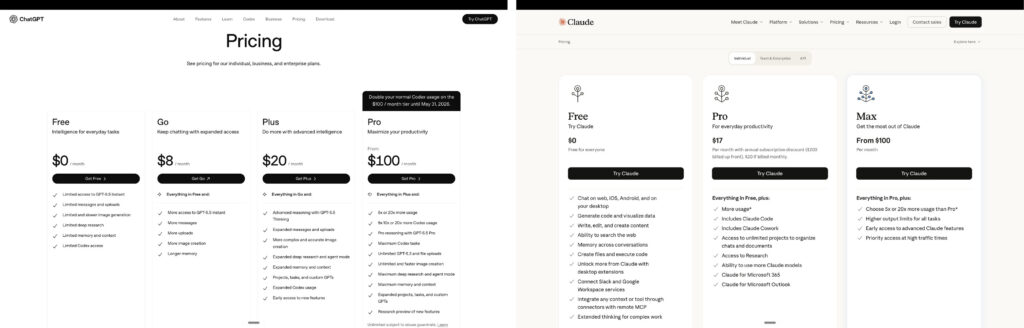
When most people ask “is AI safe?” what they're actually asking is: “Is my client's information going to end up training the next version of ChatGPT and pop out in some stranger's chat in Ohio?”
And the answer depends entirely on which version of which tool you're using.
Here's the bit nobody tells you, and it applies to both ChatGPT and Claude (and basically every other major AI tool): the free and personal-paid versions have different data rules from the business and team plans.
On free ChatGPT and ChatGPT Plus, your conversations are used to train OpenAI's models by default. You can manually opt out in the settings, but you have to actually do it. Same story on free Claude and Claude Pro. The “we'll use your chats to improve the model” toggle is on by default.
On the business/team plans, that flips.
Anthropic's Commercial Terms of Service say “Anthropic may not train models on Customer Content from Services.” And further: “Customer Content is Customer's Confidential Information.” (As per May 2026 – please check for updates)
Pro tip: go into your settings right now and check the “improve the model” or “help improve Claude” toggle is OFF. If you're on a business or team plan, it should already be. If you're on a personal plan, you'll need to flick it manually, and even then, consider upgrading.
2. What a Data Processing Addendum (DPA) is and why every freelancer needs to know about it.
Here's a phrase you might not have heard before, but you absolutely should: Data Processing Addendum. Or DPA for short.
It's the legal agreement that explains how a tech platform handles personal data on your behalf, and it's the bit your clients (or their lawyers) will want to know about if they ever ask the question.
Anthropic's DPA is automatically included in their Commercial Terms of Service, with Standard Contractual Clauses incorporated. So if you're on a Claude business or team plan, you've already accepted it the moment you signed up. You can view it at any time on the Anthropic privacy site. ChatGPT has similar.
It's the same type of agreement you've already accepted a hundred times over with Google Drive, Dropbox, Mailchimp, and every other tool you use in your business. They all have a DPA.
What this means in practice: when a client asks, “Is it safe to use AI in our work together?” you've got the formal data protection agreement document to pass over to them.
Most freelancers don't even know this exists. So just by mentioning it, you immediately look about ten times more professional than your competition.
3. UK GDPR and AI: what the ICO says about Data Protection Impact Assessments (DPIAs).
The UK has some of the strictest data privacy laws in the world, which means if you follow UK rules, you're pretty much covered everywhere else too.
The ICO (the Information Commissioner's Office, our data watchdog) defines the Data Protection Impact Assessment, or DPIA, as a “key risk management tool” and an important part of integrating ‘data protection by design and by default' across your organisation. It helps you to identify, record and minimise the data protection risks of projects.
A DPIA is a sit-down-with-a-cuppa exercise where you write down: what data am I handling, where is it going, who can see it, and what could go wrong?
The ICO recommends doing one before you start any new project that involves personal data. Including, yes, introducing AI tools into your client workflow.

The bit that often gets overlooked: to assess the level of risk, you must consider both the likelihood and the severity of any impact on individuals. So a tiny risk of something catastrophic is just as worth flagging as a high risk of something minor.
If you're feeling a bit “I should probably look into this”, the ICO has a free DPIA template on their site.
What client data is safe to put into AI? A four-tier guide.
Not all client data is created equal. Some of it is completely fine to share with AI. Some of it should never go near a chat box. Here's the way we think about it:
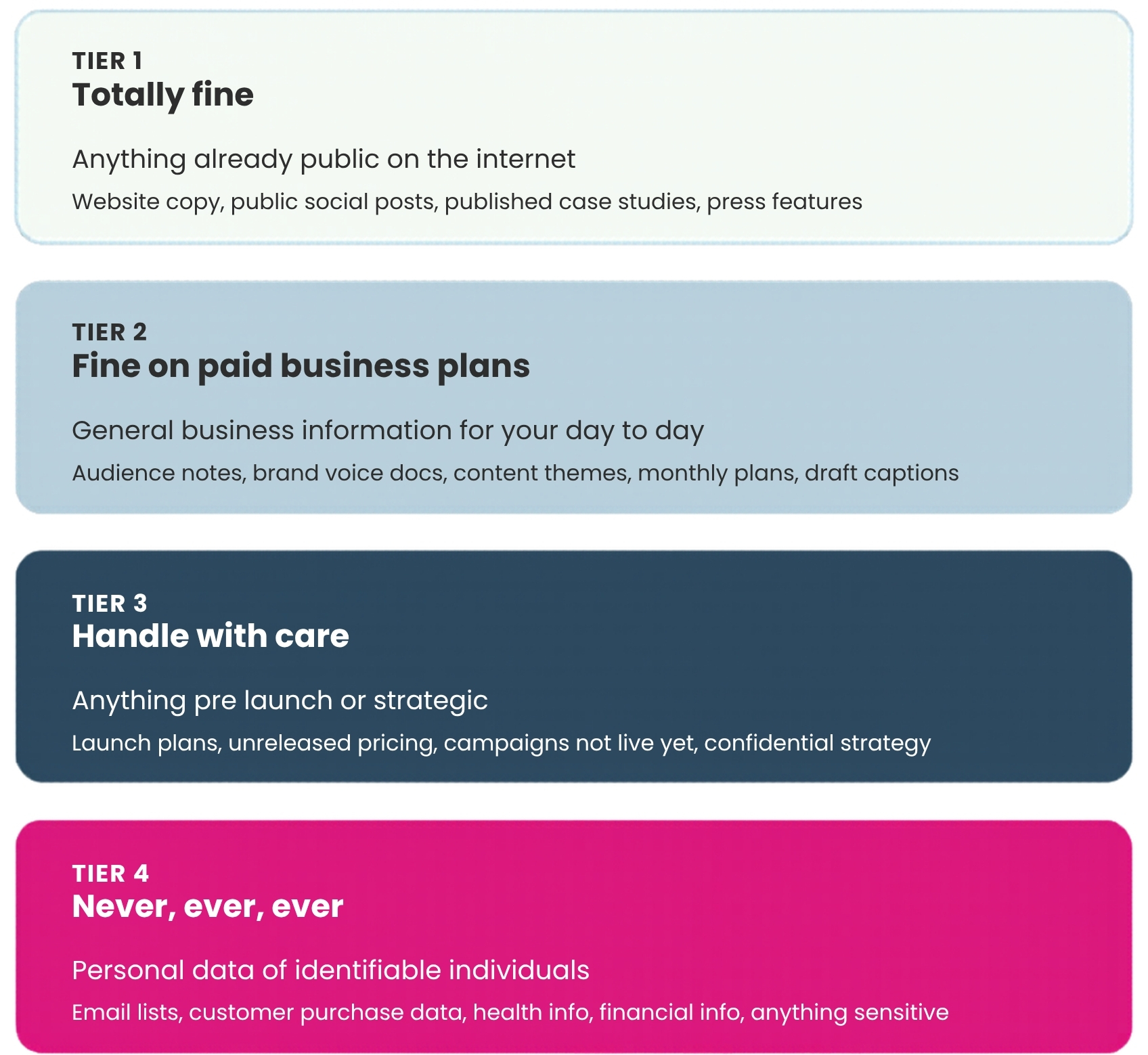
Tier 1 (totally fine): publicly available stuff. Your client's website copy, their public social posts, and their published case studies. If it's already on the internet, there's nothing to leak.
Tier 2 (fine on paid plans): general business information. Their target audience, brand voice notes, content themes, monthly content plans, and draft captions. This is the bread and butter of social media management, and it's exactly what a paid business AI plan is designed to handle.
Tier 3 (handle with care): anything pre-launch or strategic. A product launch plan, unreleased pricing, a campaign that hasn't gone live yet. Technically fine on a business plan, but it's worth being explicit with your client that you're using AI to help draft this stuff, and storing it in a properly segregated folder (more on that in section 5).
Tier 4 (never, ever, ever): personal data of identifiable individuals. Email lists with real addresses. Customer purchase histories. Health information. Financial details. Anything that would make you wince if it appeared on a billboard. This stuff needs proper anonymisation before it goes anywhere near AI, or it doesn't go in at all.
A useful gut check we use: Would you put this file in your client's Google Drive? If yes, you're probably fine to use it with AI on a paid business plan. If no, don't.
How to safely use AI with client data.
Create a dedicated AI workspace folder. Whether you're in Google Drive, OneDrive, or on your desktop, set up a specific folder that holds only the files you're happy for AI to see. Not your whole Drive. Not your whole desktop. A defined, ring-fenced area.
When you connect AI tools (like Claude's connectors, or Claude Cowork) to your file system, you point them at THAT folder only. Anything outside it is invisible to the AI. This is the same logic banks use. Compartments.
Switch off model training. We've said this already, but it bears repeating. In your AI tool's privacy settings, double-check that the “help improve the model” toggle is off. On business and team plans, this should be the default, but don't take our word for it. Check the toggle is off in your account.
Add an AI clause to your client contract. A short paragraph that explains you use AI tools to support content creation, research, etc., and that the tools you use have formal data processing agreements. Also, explain what you'd never input into AI systems. Most clients won't even ask follow-up questions, but the fact that you've thought about it puts you miles ahead. (We'd recommend you get legal advice on this.)
Run a quick DPIA. Use the ICO template.
The honest truth about AI privacy and freelance social media management.
Most of the panic around AI and client data isn't actually about sensitive data. The same information people are terrified to put into ChatGPT is already on their clients' website, social channels, and other online tools.
And the data that actually needs protecting is much smaller than people think. Customer email lists. Real names and contact details. Financial information, etc. That's the stuff that warrants real care.
Using AI safely and responsibly is just a series of small, sensible decisions about which tools, which plans, which folders, which files you're using. Get those right, and you can crack on with using AI to give yourself your evenings back, take on better-paying clients, and stop drowning in admin.
Which is the whole point of all of this, isn't it?
Ready to use AI properly in your social media business?
We keep the members of our membership properly up to date on AI, systems, sales, and everything else that actually matters when you're running a freelance social media business that pays you properly.
Read this next → How to get better results with AI as a social media manager.
Frequently Asked Questions
Is it safe to put client information into ChatGPT?
It depends on which plan you're on. ChatGPT Free and ChatGPT Plus use your conversations to train OpenAI's models by default. ChatGPT Business and Enterprise don't. If you're using ChatGPT for client work, you should be on Business or Enterprise.
Does Claude use my data to train its models?
On Claude's free and Pro plans, the default is that your conversations can be used to improve the model unless you switch it off in settings. On Claude business and team plans, training on your data is contractually prohibited under Anthropic's Commercial Terms of Service.
What is a Data Processing Addendum (DPA)?
A Data Processing Addendum is a legal agreement that sets out how a tech platform handles personal data on your behalf. It's standard for most business software, including Google Drive, Dropbox, Mailchimp, ChatGPT Business, and Claude Team. It's the document you'd show a client who asks how their data is being handled.
Do I need to do a DPIA before using AI with client data?
The UK ICO recommends doing a Data Protection Impact Assessment (DPIA) before starting any new project that involves personal data, including introducing AI tools into your workflow. It's not always legally required, but it's good practice and the ICO has a free template you can use.
Can I use the free version of ChatGPT for client work if I turn off training?
You can opt out of training on free and Plus plans, but the default is still set up for training, which means a one-click mistake can put client data in the wrong place. Business and team plans default to private, which is a safer foundation when client work is involved.
What client data should I never put into AI?
Personal data of identifiable individuals: email lists with real addresses, customer purchase histories, health or financial information, and anything pre-launch that hasn't been agreed for AI use. This data needs proper anonymisation before it goes near AI, or it stays out entirely.
Last Updated on May 27, 2026 by Laura Moore
